Overview

Welcome to our product updates in May 2025!

This month, we celebrated SkyCiv’s 10th anniversary! Our team from around the world came together in Sydney to mark a decade of building smarter and more accessible software for structural engineers. And while we took a moment to celebrate, we’ve also been focused on continuing to improve the platform. Let’s take a look at what’s new:
SkyCiv Structural 3D

Quick Member Length Editing

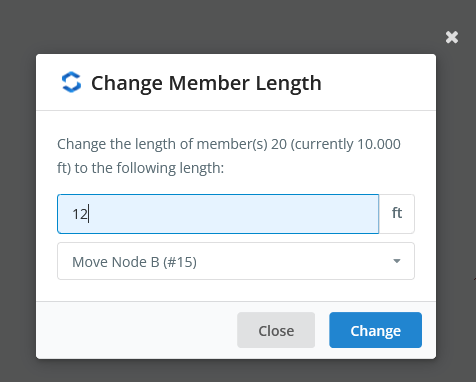
The S3D interface now includes a feature that lets you quickly edit a member’s length without manually adjusting node coordinates. Just right-click the member or group of members, select “Change Member Length,” enter the new value, and choose whether to move end A or end B.
  Member Length Editing

New Plate Mesher Update

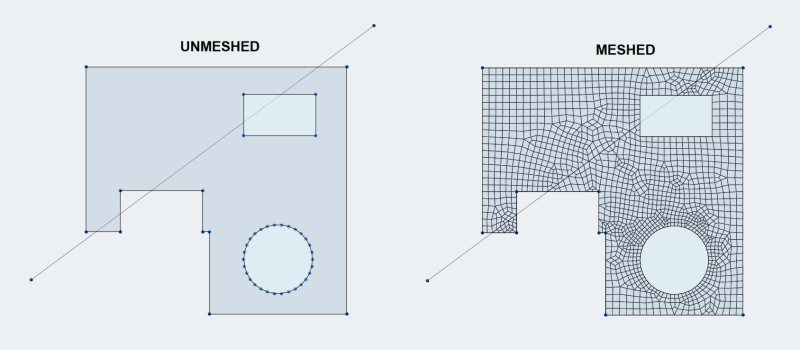
The S3D plate mesher can now handle meshing along members crossing the plate’s borders or the plate’s holes (i.e., members partially within a plate). Previously, these members were ignored during meshing. The example below shows a complex (and somewhat unrealistic) case that highlights the new capability. Mesh nodes are now placed along members that pass in and out of the plate and its openings. This improvement means continuous members no longer need to be split where they intersect with the plate border.

S3D Plate Mesher Update

Added ASCE 7-22 Spectral Loads

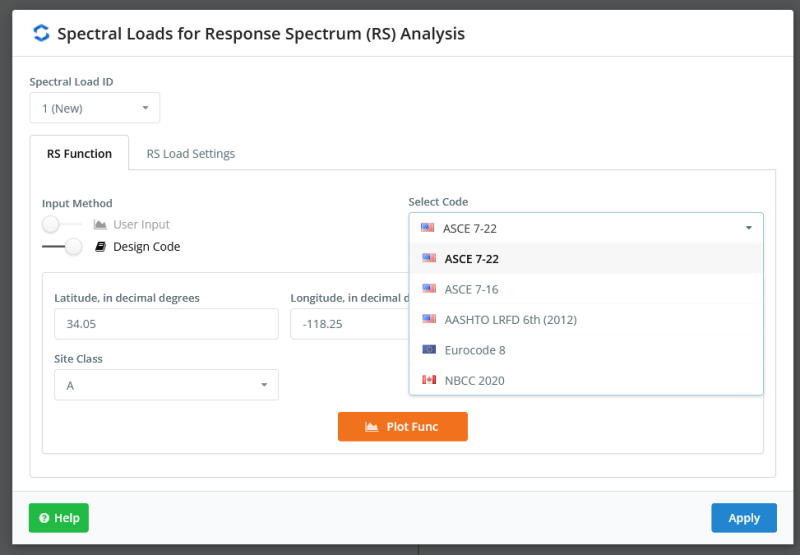
S3D also now supports spectral loads from the ASCE 7-22 design code for response spectrum analysis. Previously, only ASCE 7-16 was available.

SkyCiv Section Builder