
Reliable, Easy to Use Design Software
3D structural analysis
Capabilities for modelling and analysing simple to complex structures.
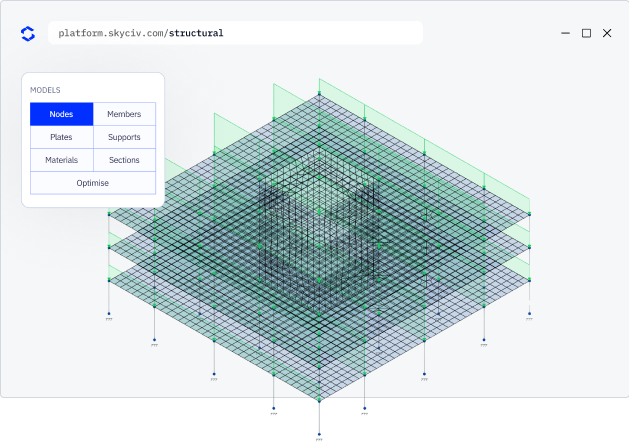
Quick structural modelling
Create detailed structural models using flexible tools designed for engineering workflows
- Flexible modeling methods: pen tool, copy & paste, spreadsheet entry, gridlines and intuitive operation functions.
- Multiple structural elements: beams, plates, cable elements, rigid links and non-linear supports within one model.
- Extensive section and material libraries: over 25,000+ database sections and 1,500+ materials from standards and manufacturers across the world.
WHY ENGINEERs SWITCH
Structural analysis software that runs the full workflow
Easy and powerful FEA analysis
Run linear, non-linear, buckling and dynamic analysis within a single solver. No separate modules for complex analysis types.
Integrated design checks
Steel, concrete, timber and cold-formed design modules run directly on your analysis results. No exporting, re-entry or version mismatches.
Detailed calculation reports
Every formula, design check and
reference is shown in full, so you can defend every number, not just the result.
WHY ENGINEERs SWITCH
What SkyCiv offers
Capabilities for modelling and analysing simple to complex structures.
Quick structural modelling
Create detailed structural models using flexible tools designed for engineering workflows
- Flexible modeling methods: pen tool, copy & paste, spreadsheet entry, gridlines and intuitive operation functions.
- Multiple structural elements: beams, plates, cable elements, rigid links and non-linear supports within one model.
- Extensive section and material libraries: over 25,000+ database sections and 1,500+ materials from standards and manufacturers across the world.
Load definition & combinations
Apply the full range of structural loads and organise them into code-compliant combinations.
- Multiple load types: point, distributed, area, thermal, self-weight and notional loads.
- Load case management: create, organise and attribute load cases to load groups within a single model.
- Automated load combinations: generate combinations using built-in design schemas or define custom combinations.
Advanced structural analysis
Run the full analysis sequence on a single model without switching solvers.
- Multiple analysis types: linear static, non-linear (P-Delta), buckling, dynamic and response spectrum analysis.
- Plate finite element modelling: mesh plates with support for cut-outs, connected members and rigid diaphragms.
- Cable and tension element analysis: model cable behaviour with accurate non-linear response.
Results & structural behaviour
Interrogate results directly within your 3D model, export results to a spreadsheet or generate detailed reports. Results include force diagrams, stress contours, displacements and reactions.
- Internal force diagrams: axial force, shear force, bending moment and torsion moment diagrams.
- Deflection and displacement results: relative and absolute deflections at nodes and inside members.
- Support reactions and stresses: inspect internal stresses throughout members or plates. Review support reaction forces and moments.
supported standards
Globally Supported Design Standards
Capabilities for modelling and analysing simple to complex structures.
DESIGN STANDARDS
Structural design codes
Complete support for local design standards across steel, concrete, timber and more
| Category | Supported Codes |
|---|---|
| Steel design | AISC 360, AS 4100, CSA S16, BS 5950, Eurocode 3 (EN 1993), IS 800, NZS 3404 |
| Reinforced concrete | ACI 318, AS 3600, Eurocode 2 (EN 1992), CSA, BS |
| Timber design | NDS, AS/NZS 1720, Eurocode 5, CSA |
| Cold-formed steel | AISI, Eurocode, AS/NZS 4600 |
| Connection design | AISC 360, Eurocode, AS 4100 |
| Wind and seismic loading |
the skyciv difference
Make the Switch to SkyCiv
Everything your team needs to work faster,
from anywhere.
Work faster with integrated workflows
Your model integrates with more tools, saving you time and energy. Design faster, smarter and with less margin for error.


Skip the Installation
SkyCiv runs entirely in the cloud. No downloads, updates, or IT setups are required. Simply log in from any browser and start working instantly.
Engineering Support
When issues arise, our qualified engineers will quickly help you resolve them, keeping your projects on track without delays or downtime.


Easy input, easy output
SkyCiv models take minutes to set up, and the results are all clearly labelled – accompanied with detailed design reports for full calculation transparency.

Powerful Integrations,
Zero Disruption
testimonials
Trusted by thousands

The ease of use and the presentation of the results are both awesome. I have had ongoing interaction with the support team and everyone is excellent.

Mitch Frumkin
CEO OF KIPCON
It is used for various civil and mechanical engineering courses and the students love it. We are happy with the continuous updates to SkyCiv as well, highly recommended.

Dr Kenneth R. Leitch
Assoc. Prof. at Texas A&M
It was easily the most intuitive package available to learn; it is particularly easy to build the 3D model and define nodes, members, supports, materials, sections, then apply loads & combinations.

Stuart Agars
Managing Director of Struct-Sure Limited
SkyCiv has been a great tool to help efficiently and clearly document and update design results for a member of a small company with multiple responsibilities.

Lydia Fahrenkrug
Engineer at MT Solar
case studies
Real projects using SkyCiv
PRICING
Access SkyCiv Quick Design
Flexible plans for every team size.
No lock-in contracts, cancel anytime.
Get in Touch
Location
Unit 510, 55 Holt Street Surry Hills
NSW 2010 Australia
