
.fusion-body .fusion-builder-column-0{width:25% !important;margin-top : 0px;margin-bottom : 20px;}.fusion-builder-column-0 > .fusion-column-wrapper {padding-top : 0px !important;padding-right : 0px !important;margin-right : 10px;padding-bottom : 0px !important;padding-left : 0px !important;margin-left : 10px;}@media only screen and (max-width:1024px) {.fusion-body .fusion-builder-column-0{width:25% !important;order : 0;}.fusion-builder-column-0 > .fusion-column-wrapper {margin-right : 10px;margin-left : 10px;}}@media only screen and (max-width:640px) {.fusion-body .fusion-builder-column-0{width:50% !important;order : 0;}.fusion-builder-column-0 > .fusion-column-wrapper {margin-right : 10px;margin-left : 10px;}}
.fusion-body .fusion-builder-column-1{width:50% !important;margin-top : 0px;margin-bottom : 20px;}.fusion-builder-column-1 > .fusion-column-wrapper {padding-top : 0px !important;padding-right : 0px !important;margin-right : 10px;padding-bottom : 0px !important;padding-left : 0px !important;margin-left : 10px;}@media only screen and (max-width:1024px) {.fusion-body .fusion-builder-column-1{width:75% !important;order : 0;}.fusion-builder-column-1 > .fusion-column-wrapper {margin-right : 10px;margin-left : 10px;}}@media only screen and (max-width:640px) {.fusion-body .fusion-builder-column-1{width:50% !important;order : 0;}.fusion-builder-column-1 > .fusion-column-wrapper {margin-right : 10px;margin-left : 10px;}}
.fusion-body .fusion-builder-column-2{width:25% !important;margin-top : 0px;margin-bottom : 20px;}.fusion-builder-column-2 > .fusion-column-wrapper {padding-top : 0px !important;padding-right : 0px !important;margin-right : 10px;padding-bottom : 0px !important;padding-left : 0px !important;margin-left : 10px;}@media only screen and (max-width:1024px) {.fusion-body .fusion-builder-column-2{width:25% !important;order : 0;}.fusion-builder-column-2 > .fusion-column-wrapper {margin-right : 10px;margin-left : 10px;}}@media only screen and (max-width:640px) {.fusion-body .fusion-builder-column-2{width:100% !important;order : 0;}.fusion-builder-column-2 > .fusion-column-wrapper {margin-right : 10px;margin-left : 10px;}}
.fusion-body .fusion-flex-container.fusion-builder-row-1{ padding-top : 24px;margin-top : 0px;padding-right : 30px;padding-bottom : 4px;margin-bottom : 0px;padding-left : 30px;}@media only screen and (max-width:1024px) {.fusion-body .fusion-flex-container.fusion-builder-row-1{ padding-right : 40;padding-left : 40;}}@media only screen and (max-width:640px) {.fusion-body .fusion-flex-container.fusion-builder-row-1{ padding-right : 20;padding-left : 20;}}

SkyCiv Documentation

Your guide to SkyCiv software — tutorials, how-to guides and technical articles

Datasheets

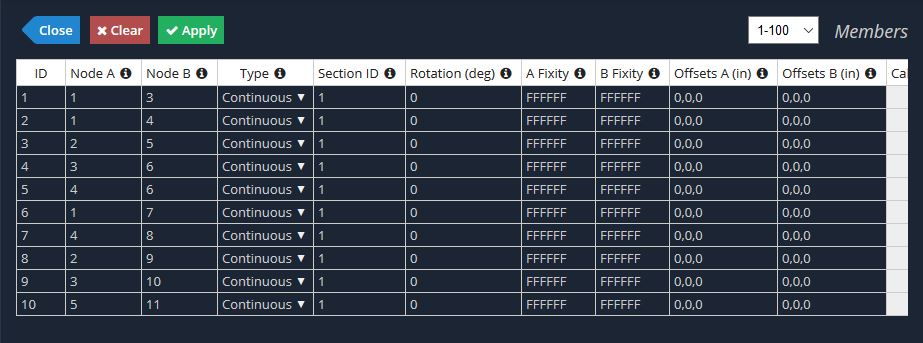
  Datasheets are a tabulated way to view and enter data in a quick and easy manner. They provide an alternative way to enter information from the forms.

datasheet 1Datasheets can be found in most menus of SkyCiv Structural 3D. Each row represents a new entry, and each column represents a different field.

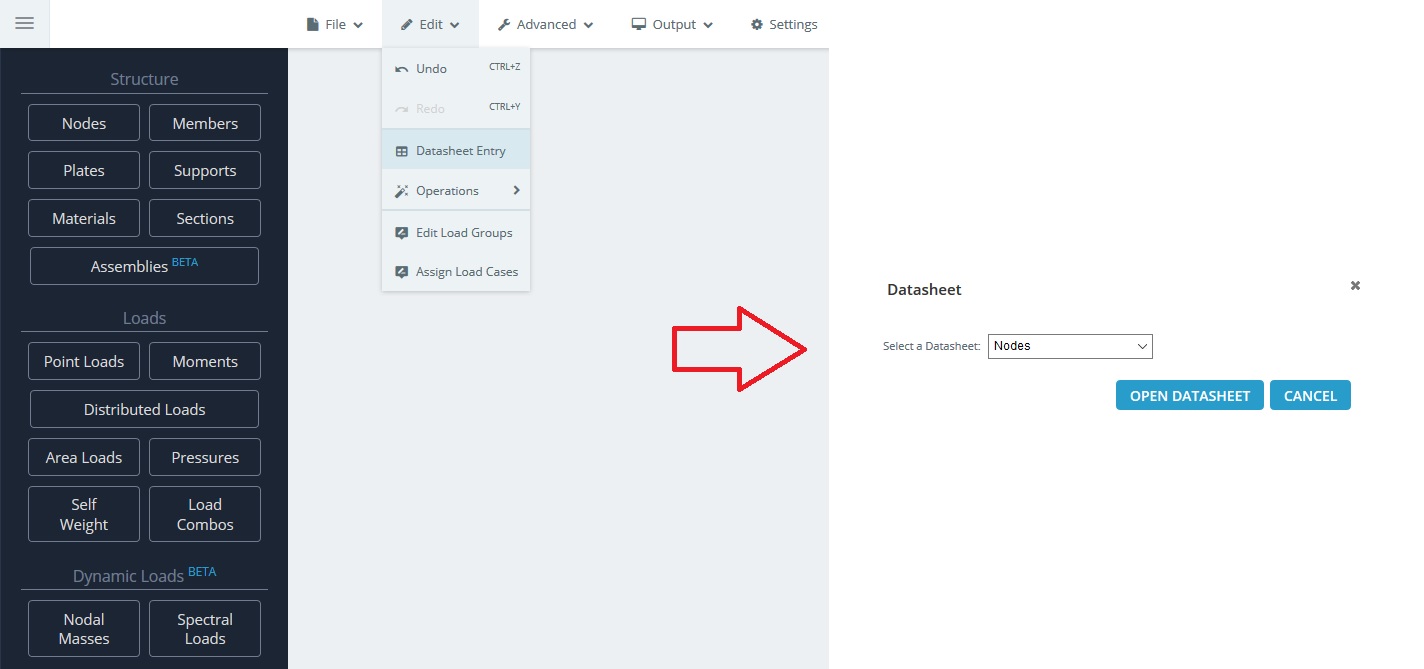
The datasheet has a range of benefits to the user; enabling them to view and edit a number of components with speed and ease. There are two ways to open the datasheet for a particular component:

  1. On the navigation bar, go to Edit > Datasheet Entry and pick the spreadsheet you want to accessdatasheet 3
  2. By clicking the Datasheet icon in the top right corner of the entry form as shown:
The datasheet acts much like an Excel Spreadsheet. Once the datasheet is open, you can make the most of the following functionality:

  • Copy/Paste values from excel or other spreadsheet programs
  • Drag cells to copy (Select the cell, then drag the bottom right corner in the direction you wish to copy)
  • Multiple Select and Delete
  • Sort by column to view particular data

In addition to the above, the following notes about the datasheet should be understood:

  • Changes will not be submitted until the user hits ‘Apply’
  • A blank or incomplete row will be ignored by the program
  • Right-clicking a cell will allow you to remove rows and undo/redo
  • Add multiple rows using the function in the bottom right corner

How can we help?

×

Updated October 22, 2022

Still stuck? Contact us

Go to Top